Back

AI Product Design - UX Research - Interaction Design

PlantPal turns fragmented plant care into one focused AI ecosystem.

A published mobile web app that combines AI identification, saved watering reminders, and a private photo journal without registration.

Role
Product Designer
Scope
Research, UX, UI, AI Flow
Team
Individual Project
Tools
Framer, OpenAI, Supabase
Timeline
8 Weeks

Overview

The Context

People buy plants because they want their homes to feel more alive, natural, and personal. But care quickly becomes a repeating cycle: they get busy, forget watering or light needs, watch plants decline, then buy another plant and start over.

PlantPal breaks that loop by turning identification, reminders, and growth tracking into one care system that supports motivation after the purchase moment fades.


What I Did

I conducted generative research with 6 plant enthusiasts to uncover the "tool fatigue" phenomenon. I designed a streamlined UX that consolidated 3 separate use-cases into one app.

Going beyond static mockups, I connected the OpenAI API through Supabase to identify photos, save plants, record watering, and keep private multi-photo journals.

Try PlantPal

Problem

People want healthy plants, but busy routines make care easy to forget and hard to sustain.

Research

Plant care
isn’t difficult.
It’s fragmented.

Plant owners rely on multiple disconnected tools for everyday care.

Search Reminders Notes Calendar
Everyday care
is scattered
across disconnected
tools.
Care Connected Support

Design priority: bring identification and everyday care into one flow.

Routine Plant Care Habits

Design priority: make recurring care easier to remember.

Context Care Guidance

Design priority: keep guidance connected to each saved plant.

Illustrative Scenarios · Not verbatim interview transcripts

Illustrative student persona portrait
Student
"I never know when to water."
Illustrative office worker persona portrait
Office Worker
"I use Notes, Google, and reminders."
Illustrative beginner persona portrait
Beginner
"I forgot what plant this is."
Q1 What's your biggest challenge when caring for plants?
What's your biggest challenge when caring for plants?Me
I like having plants at home, but I get busy and forget until the leaves start looking bad.Sarah, Marketing Manager, 28
I want my plants to thrive, but the care habits are hard to maintain once the excitement of buying them fades.Alex, Graduate Student, 24
How do you currently manage plant care tasks?Me
I set random alarms like "Plant 1" and "Plant 2," then ignore them when work gets busy.Sarah, Marketing Manager, 28
I take notes and photos, but there is no simple loop that keeps me motivated to check back in.Alex, Graduate Student, 24
Where does the process break down most often?Me
I buy plants to make my apartment feel nicer, then forget the care routine and end up replacing them.Sarah, Marketing Manager, 28
When a plant declines, I usually realize too late. I need earlier nudges and visible progress.Alex, Graduate Student, 24

Persona

Two illustrative personas frame the care challenges.

Alex and Sarah are design personas, not verified interview participants. Their profiles and the dialogue above illustrate care scenarios: forgetting routines, losing plant context, and needing clearer follow-through.

Alex and Sarah illustrated user personas

Alex

Graduate Student, 24

  • Owns 15+ plants at home
  • Loves collecting rare species
  • Documents growth with photos
  • Needs motivation to keep long-term care consistent
"I love collecting plants, but keeping up with each one's care needs becomes overwhelming."

Sarah

Marketing Manager, 28

  • Works 50+ hours per week
  • Wants her apartment to feel more alive
  • Has killed 3 plants in 6 months
  • Struggles to remember watering schedules
"I love the idea of plants, but I just can't keep them alive with my schedule."

Pain Points

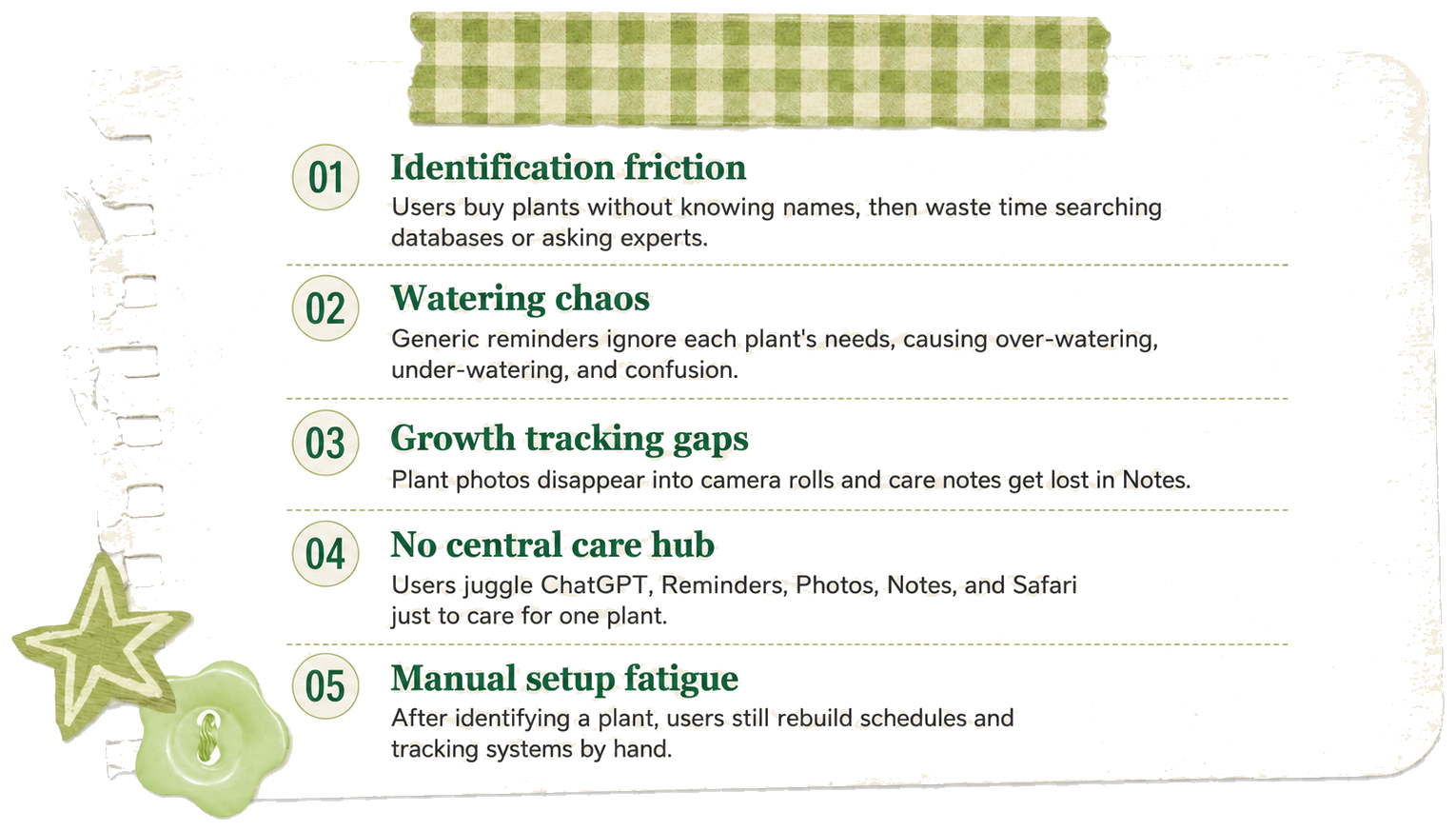
The story was a care cycle: desire, forgetfulness, plant decline, then replacement.

Five PlantPal pain points: identification friction, watering chaos, growth tracking gaps, no central care hub, and manual setup fatigue

The Root Cause

Extreme tool fragmentation.

Users were not lacking motivation. They lacked one connected system that could move from plant identification to care guidance, reminders, and growth records.

AI Identification Smart Reminders Growth Journal

Design Goal

Design and build a mobile-only AI care workflow, not just another chatbot.

PlantPal uses a photo as the entry point, then connects the result to a saved plant profile. In-app watering reminders, collection management, and photo memories keep the care workflow together.

The product is mobile-only: users photograph plants, check care reminders, and write journals near the plant. A private guest session removes registration; records remain tied to that browser.

AI-powered Care Flow

Identification becomes the trigger.

  • AI identifies the plant from a mobile photo.
  • Users review the result and save it to their private Garden.
  • Reminders, garden management, and journal records keep the workflow active after the scan.
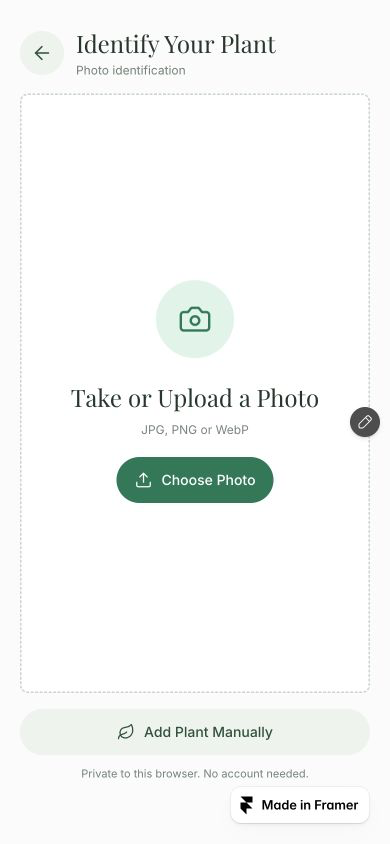
PlantPal photo upload without registration 01 Take photo
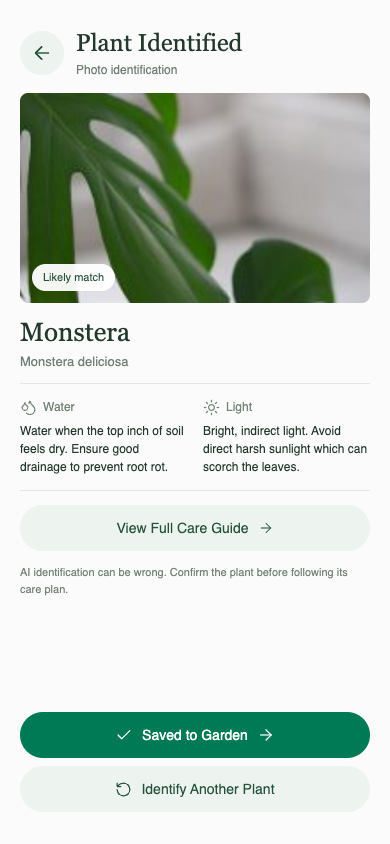
Real OpenAI identification result saved to Garden 02 Identify
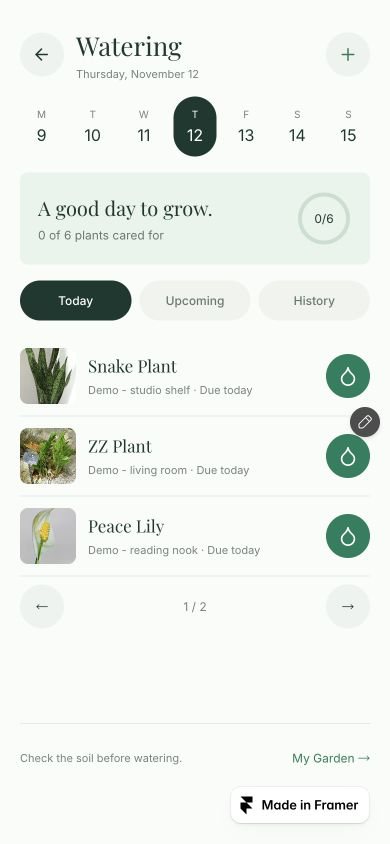
PlantPal live watering reminders and care progress 03 Schedule
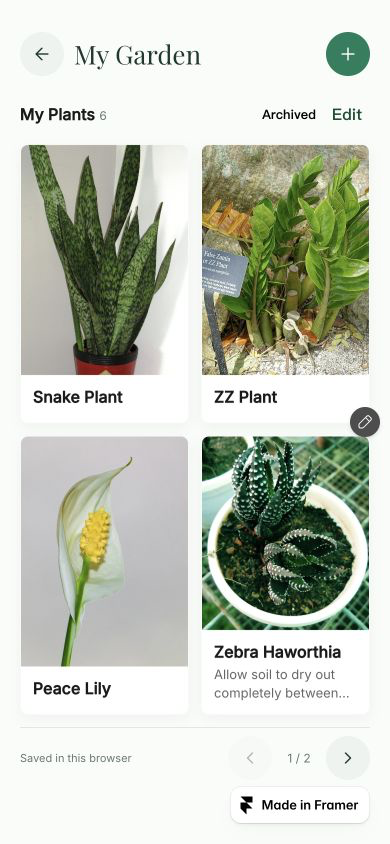
PlantPal Garden with six saved demonstration plants 04 Manage

Before

Manual care setup

Search Google Compare images Read care guide Record manually
  • Multiple apps
  • Manual work
  • High cognitive load

After

One connected flow

Photo OpenAI Care plan Garden
  • One photo
  • One workflow
  • No registration

Designing for AI Uncertainty

Uncertainty needs a recovery path.

The live flow labels a likely match and lets users review or retry. The percentages here are design examples, not measured AI accuracy.

Example Confidence ≈0%

85%

65%

42%

Photo OpenAI
Likely match Review and save
Unclear result Ask user to rescan

Design Exploration & Iteration

The most important design decision was how to simplify the product around care.

The Initial Concept

An All-in-One Platform

In my first iteration, PlantPal included four main features: AI Identification, Care Reminders, Growth Journal, and Shop.

The logic seemed sound: If users need help caring for plants, they must need supplies too. Why not let them buy soil, fertilizer, and pots directly in the app?

Version 1.0 with Shop

Scan - Schedule - Shop - Journal

Four tabs competing for attention, with Shop diluting the core value proposition.

Refocused Version

Scan - Schedule - Journal

Clean, focused navigation that reinforces the core workflow: Scan to Schedule to Track.

Prototype Before Testing

Scan - Schedule - Shop - Journal

Before testing, I built the first interactive version with Shop included. This made the product testable as a real navigation decision, not just a theoretical feature list.

Scan Schedule Shop Journal

The prototype was designed to explore whether Shop belonged in the care workflow or distracted from it.

Design Synthesis

The redesign prioritized plant care support over a shop.

The process book records feedback about complex pages, confusing navigation, and distracting buttons. The scenarios below illustrate the care-first rationale; names, portraits, and dialogue are illustrative, not verified participant records. Source and evidence scope.

Think

  • I can already buy plant supplies anywhere.
  • I mostly need help knowing what my plant needs.
  • Shopping is not the reason I open this app.
  • A shop tab feels extra.

Do

  • Skip the Shop tab
  • Use Amazon, Target, or local nurseries
  • Open the app for identification and reminders
  • Compare products elsewhere

Feel

  • Focused on care, not shopping
  • Uninterested in in-app purchasing
  • Slightly overwhelmed by extra features
  • More confident when the app stays simple

Say

  • "I'd just buy this on Amazon."
  • "I already have local places to shop."
  • "I want care help more than a store."
  • "The app should help me care for plants, not sell to me."
"I downloaded this kind of app to figure out what's wrong with my plant. If I need supplies, I already know where to buy them."
Jia Chen portrait

Jia Chen22 - Graduate Student
Student / Beginner Plant Owner

"The Shop tab feels extra. I'd probably ignore it and go straight to care tips or reminders."
Yuki Sato portrait

Yuki Sato24 - Marketing Coordinator
Working Professional / Plant Hobbyist

"I already use Amazon or my local nursery. An in-app shop doesn't really add value for me."
Marcus Reed portrait

Marcus Reed23 - IT Support Specialist
Working Professional / Plant Newbie

"I like browsing plants in person, so I wouldn't buy from the app. I just want reliable care advice."
Linh Nguyen portrait

Linh Nguyen25 - Product Design Student
Student / Plant Enthusiast

"If I saw a Shop page, I'd assume it was trying to sell me something. I'm here for plant care, not shopping."
Ethan Brooks portrait

Ethan Brooks24 - Elementary School Teacher
Working Professional / Indoor Plant Owner

"The care tools are the reason I'd keep using PlantPal. Shop makes the experience feel less focused."
Anaya Patel portrait

Anaya Patel24 - Data Analyst
Working Professional / Balcony Gardener

Design Rationale

The design direction: reduce distraction and refocus the experience.

01 x Priority

Keep care central

Shop was outside the core care loop. The redesign prioritizes identification, watering, and records.

02 x Consideration

Purchasing elsewhere

Existing shops are an alternative. This is a design consideration, not a measured participant preference.

03 x Goal

Align with care goals

The chosen direction prioritizes identification, reminders, and care guidance over commerce features.

04

Decision Made

Refocus Experience - Strengthen the care loop

Plant Care Identification Reminders

I moved away from the Shop direction to focus the product on care tasks. Whether that improves clarity and continued use still needs to be measured.

This design decision informed the final navigation: a tighter care loop around scanning, scheduling, and journaling.

Build Evidence

The project moved from full Figma system design into a published mobile care app.

Figma shaped the mobile system; Framer delivers the interface. OpenAI identifies plants, while Supabase protects guest-owned plants, watering records, and journal photos.

Current PlantPal Figma Page 2 with mobile care screens, watering animation states, and photo journal flows

01 x Figma System

Complete mobile product map

Current Page 2 brings together Home, identification, Garden, watering states, and the photo journal, including writing, stacked photos, and gallery views.

Current Supabase query results showing six saved demonstration plants

02 x Supabase

Real plants, saved in Supabase

A read-only query shows six demo plants saved through identification and manual entry. Only plant details are shown; account identifiers and credentials are excluded.

Current PlantPal Home in the Framer editor with the original botanical background, watering reminders, and recent journal

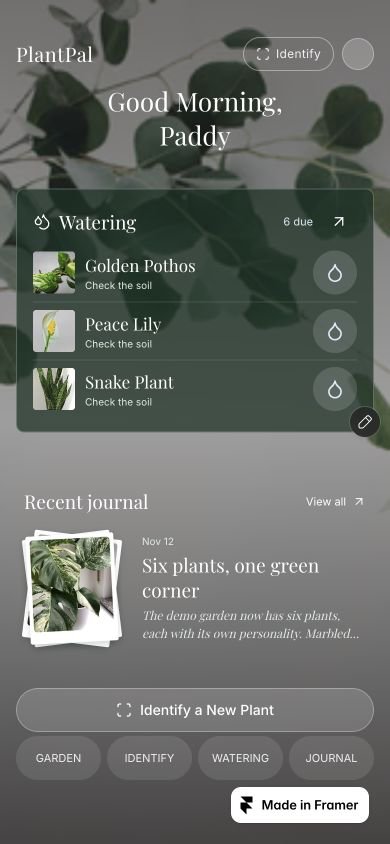
03 x Framer Home

A connected mobile home

The current Framer canvas preserves the original botanical background while bringing watering reminders, recent journal entries, and core navigation into one mobile view.

Current Framer mobile preview of plant identification with photo upload, manual entry, and no registration

04 x Framer Identify

From a photo to your Garden

The current mobile preview opens directly to photo upload, with manual entry as an alternative. OpenAI identification runs through Supabase, without asking visitors to register.

Feature Demo

The final product centers on four connected care moments.

Current mobile captures show saved demo content: daily reminders, real AI identification, a six-plant Garden, and three photo journals. The overview video is a screen tour.

01 x Home

Daily care, at a glance

The original botanical background now frames live watering reminders, the latest photo memory, and identification.

02 x Identify

Photo to saved plant

OpenAI identifies an uploaded photo. Users review care guidance, retry when needed, or save the result to Garden.

03 x Garden

Scannable collection view

Photo cards open saved plant details. Identification and manual entry both create private, persistent Garden records.

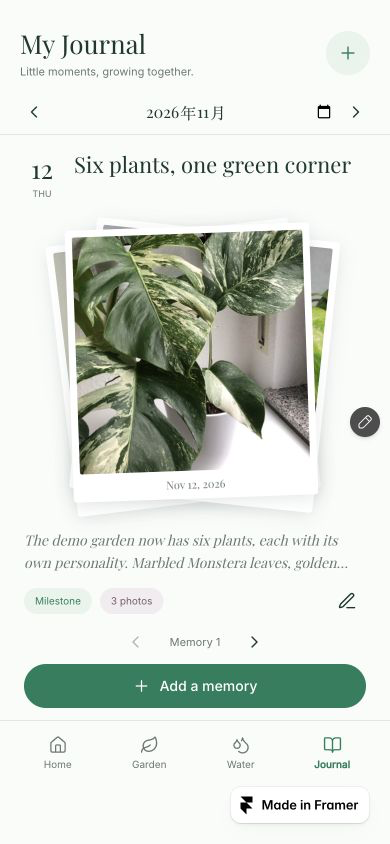
04 x Journal

A personal photo diary

Stack up to six photos, open them to browse, and save a title, date, story, and category privately in Supabase.

PlantPal Home with live reminders and a recent journal preview
PlantPal mobile photo identification entry
PlantPal private Garden with six saved plants
PlantPal saved photo journal with a three-photo stack

Final Solution

The final system connects one action to the next.

PlantPal is structured as a single care loop. Identification is not an isolated feature: it becomes the trigger for scheduling, daily action, and long-term growth records.

01

Identify

Review the AI result, then save to Garden.

02

Plan Care

Saved intervals guide in-app reminders.

03

Act Daily

A filling drop confirms a saved watering.

04

Record Growth

Photo stacks keep notes and milestones.

Implementation & Takeaways

PlantPal connects identification, care, and saved records.

The final direction is not another feature-heavy plant app. It is a connected care system where identification, reminders, and growth records support one core behavior.

Photo Identification Scan

A November 12 technical walkthrough recorded a real photo identification response.

Saved Record Save

The same walkthrough checked saving a private Garden record and reloading it.

Product Focus

Reducing distraction was the design goal.

The process book describes simplifying navigation and removing distracting controls. The final system centers on scan, schedule, and journal; its effect on user behavior is not yet measured.

AI UX

Make uncertainty visible to support trust.

Real photo identification, save confirmation, and reload checks moved the app beyond mockups. Likely-match labels and retry paths keep AI uncertainty visible.

Reflection

What I learned from turning research into a working product.

What I Learned

AI is strongest when it supports a complete behavior loop.

The key design challenge was not adding AI for novelty. It was deciding where AI should enter the user journey, how much confidence to show, and how the result should become a useful care action.

Future Improvement

Keep care useful beyond one browser.

Guest access makes the first visit simple, but clearing browser data loses access. Optional account recovery and cross-device continuity are next, alongside more adaptive care plans.